• Skip to main content
  • Skip to main content
Choose which site to search.
University of Arkansas for Medical Sciences Logo University of Arkansas for Medical Sciences
Educational Development
  • UAMS Health
  • Jobs
  • Giving
  • About Us
    • Faculty and Staff
    • Assistance Request Form
  • eLearning
    • Blackboard Ultra
      • Blackboard Ultra How-To
      • Request a Sandbox
      • Training Resources
      • Ultra Transition Tips
    • Class for Zoom
    • eLearning Blog
    • eLearning Training Sessions
    • Kaltura
      • Kaltura & Zoom Integration
      • Kaltura How-To
    • PointSolutions
    • Respondus 4.0
    • Respondus LockDown Browser + Monitor
    • Sharing A Box File In Blackboard or O2
    • SoftChalk Cloud
    • StudyMate Campus
  • Instructional Design
    • Active Learning Strategies
    • Consulting Services
    • Course Design & Review
    • Learning Object Design
    • Program Planning
    • Contact Us Today
  • Teaching Resources
    • Copyright
    • Course Basics
    • Multimedia Support
    • New to Teaching
    • Teaching Resources Blog
    • Teaching Tips
  • Teaching Scholars
    • Teach the Teacher Symposium
    • Teaching Scholars
    • WRITE — Writing for Research In Teaching and Education
    • Recent Publications & Presentations
    • Staff
    • Resources
    • College of Health Professions Teaching Scholars 2025
    • Teaching Scholars 2026
  • Educators Academy
    • Educators Academy Guide
    • Event Offerings and Registration
      • Development for Faculty
      • ESSC Faculty Development Continuing Education Information
      • Registration for Faculty Development Events or Programs
    • Mini Library on Teaching and Learning
    • Recognition of Commitment to Teaching Excellence
    • Teaching Observation by Peers (TOPs) Program
  • Quality Matters
    • About QM
    • Why QM?
    • The QM Rubric
    • Get Involved
    • Resources & Support
    • Fall APPQMR Training Sessions
  • Digital Accessibility
  • Educational Innovation Grant
  • Evaluation
  • Media Support
  1. University of Arkansas for Medical Sciences
  2. Educational Development
  3. eLearning
  4. Kaltura
  5. Kaltura How-To
  6. How to Edit Captions in Kaltura

How to Edit Captions in Kaltura

1 From base navigation, click on Tools and then select Kaltura My Media.
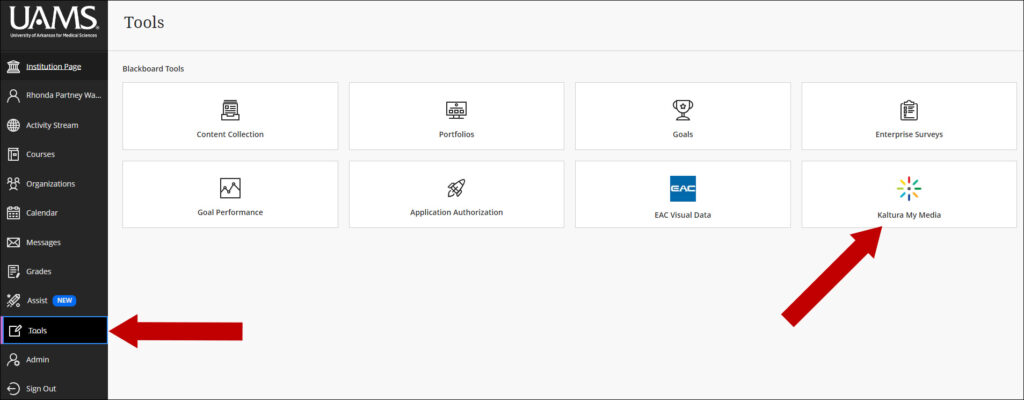
From base navigation, click on Tools and then select Kaltura My Media.

2. Locate the video you wish to add or edit captions and click on the pencil to edit.
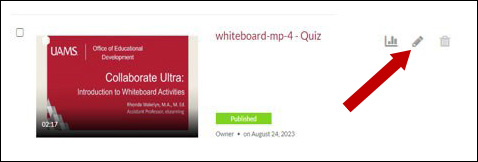
Locate the video you wish to add or edit captions and click on the pencil to edit.

3. Select Captions from the options shown here:
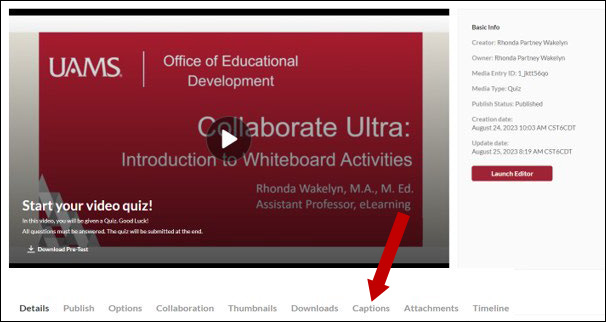
Select Captions from the bottom of the page.

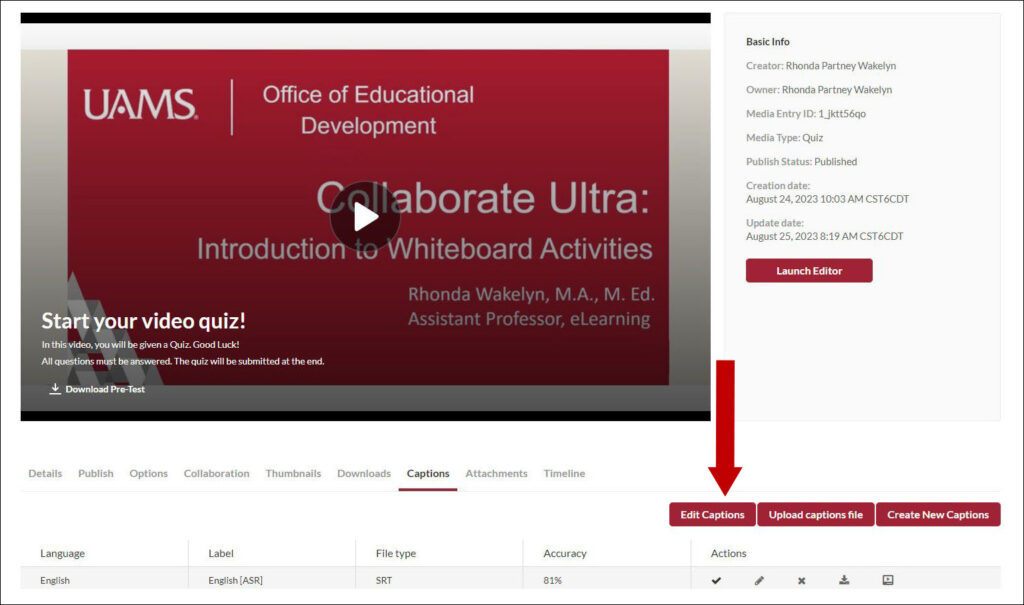
4. Select Edit Captions.

Select Edit Captions button.

5. From the Closed Captions Editor, you can add, delete, or edit captions. To add a new caption, hover over the editor as shown here and click on the plus sign to add the caption. To edit an existing caption, click on the text field and enter the text. To delete, click on the Delete icon. When finished, click the Save button.
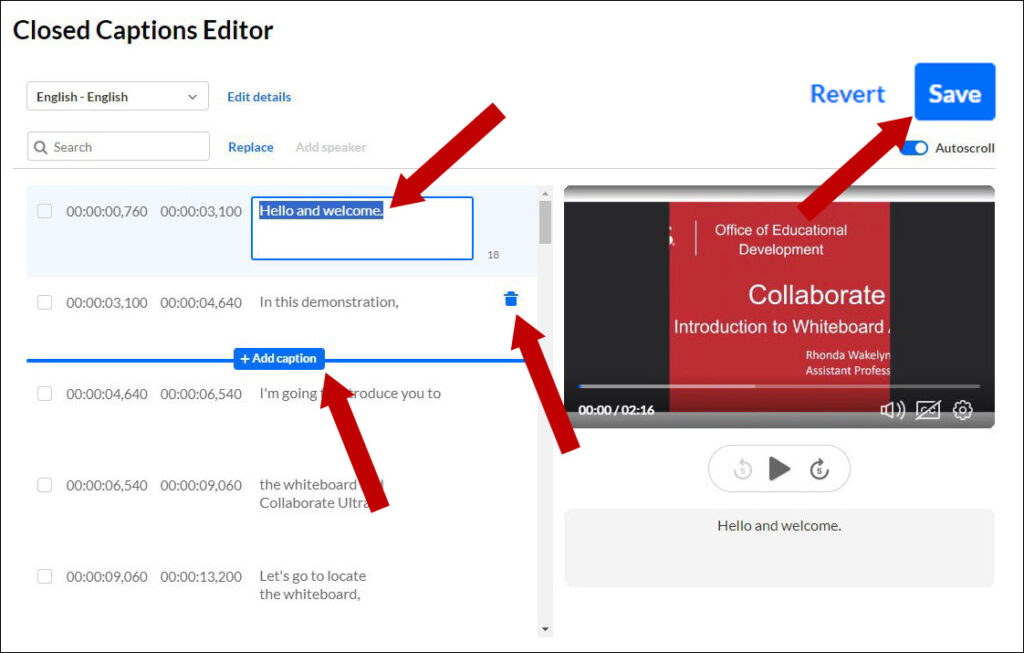
From the Closed Captions Editor, you can add, delete, or edit captions.
University of Arkansas for Medical Sciences LogoUniversity of Arkansas for Medical SciencesUniversity of Arkansas for Medical Sciences
Mailing Address: 4301 West Markham Street, Little Rock, AR 72205
Phone: (501) 686-7000
  • Facebook
  • X
  • Instagram
  • YouTube
  • LinkedIn
  • Disclaimer
  • Terms of Use
  • Privacy Statement
  • Legal Notices

© 2026 University of Arkansas for Medical Sciences