• Skip to main content
  • Skip to main content
Choose which site to search.
University of Arkansas for Medical Sciences Logo University of Arkansas for Medical Sciences
Educational Development
  • UAMS Health
  • Jobs
  • Giving
  • About Us
    • Faculty and Staff
    • Assistance Request Form
  • eLearning
    • Blackboard Ultra
      • Blackboard Ultra How-To
      • Blackboard Ultra Tip or Trick Archive
      • How to Enable Third-Party Cookies in Your Browser
      • Request a Sandbox
      • Training Resources
      • Ultra Transition Tips
    • Class Collaborate Decommission
    • Class for Zoom
    • eLearning Blog
    • eLearning Training Sessions
    • Kaltura
      • Kaltura & Zoom Integration
      • Kaltura How-To
    • PointSolutions
    • Respondus 4.0
    • Respondus LockDown Browser + Monitor
    • Sharing A Box File In Blackboard or O2
    • SoftChalk Cloud
    • StudyMate Campus
  • Evaluation
  • Instructional Design
    • Active Learning Strategies
    • Consulting Services
    • Course Design & Review
    • Learning Object Design
    • Program Planning
    • Contact Us Today
  • Media Support
  • Teaching Resources
    • Copyright
    • Course Basics
    • Multimedia Support
    • New to Teaching
    • Teaching Resources Blog
    • Teaching Tips
  • Teaching Scholars
    • Teach the Teacher Symposium
    • Teaching Scholars
    • WRITE (Writing for Research In Teaching & Education)
    • Recent Publications & Presentations
    • Staff
    • Resources
    • College of Health Professions Teaching Scholars 2025
  • Educators Academy
    • Educators Academy Guide
      • Mini Library on Teaching and Learning
      • Teaching Observation by Peers (TOPs) Program
    • Event Offerings and Registration
      • Development for Faculty
      • ESSC Faculty Development Continuing Education Information
      • Registration for Faculty Development Events or Programs
    • Recognition of Commitment to Teaching Excellence
  • Quality Matters
    • About QM
    • Why QM?
    • The QM Rubric
    • Get Involved
    • Resources & Support
    • Fall APPQMR Training Sessions
  • Digital Accessibility
  • Educational Innovation Grant
  1. University of Arkansas for Medical Sciences
  2. Educational Development
  3. eLearning
  4. Blackboard
  5. Blackboard How-To
  6. How to Make Your Course Available to Students

How to Make Your Course Available to Students

Blackboard course status can be Private (unavailable to students) or Open (available to students). There is also a Completed course status.  Students can access the content in a Completed course, but they cannot participate.

You can change the course status from the Courses page in the Base Navigation or inside the course from the course orientation bar.

A. Change course status from the Courses page.

1. Go to the Courses page on the Base Navigation menu.  Make sure the Current Courses is shown on the top page.  If you are looking for another term, please make the appropriate selection from the drop-down menu.
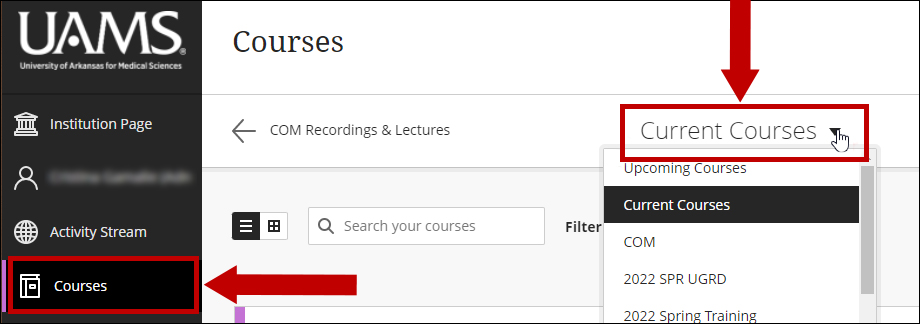
Courses page showing the Current Courses tab

2. From your course list, identify the desired course.  Click on the ellipses button on the right of the course name and choose the desired status.  In this case, we make a Private course available by using the Open course option.
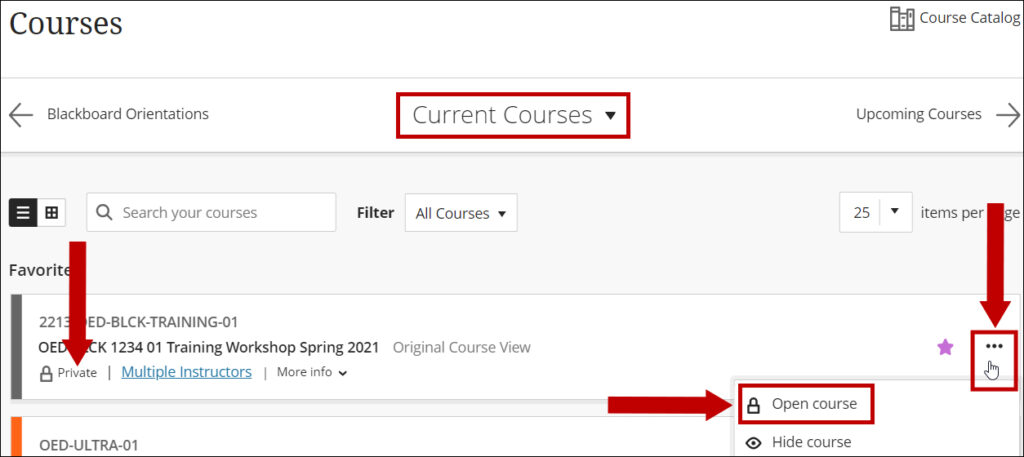
The available options for a course from the Courses page.

Note: Hide course action will hide the course from the instructor’s list, not the students.

B. Change course status from inside the course.

1. Click on your course name to enter the course and use the lock button on the Orientation bar.  In this case, we will open a private course.

Open a course by using the lock button on the course orientation bar.

2. The lock will show as open for an open course.

Unlocked button for an open course

Notes: All newly created courses are Private by default.  After updating the course content, the course instructors need to make the courses available.

If the course start date is in the future, the students will not be able to access it.  Each department sets up the course start and end dates with the registrar’s office.

University of Arkansas for Medical Sciences LogoUniversity of Arkansas for Medical SciencesUniversity of Arkansas for Medical Sciences
Mailing Address: 4301 West Markham Street, Little Rock, AR 72205
Phone: (501) 686-7000
  • Facebook
  • X
  • Instagram
  • YouTube
  • LinkedIn
  • Pinterest
  • Disclaimer
  • Terms of Use
  • Privacy Statement
  • Legal Notices

© 2026 University of Arkansas for Medical Sciences